Subject: Preliminary Requirements for Gamma Counter Software
1. Introduction
This report is the result of a two week requirements analysis. It provides an overview of a proposed design for gamma counter software, enumerates tasks needed to implement the design, and provides rough time estimates for those tasks.
I have reviewed the current gamma counter software up to understanding its overall logic and workflow design. The current system, PTECH, was last worked on in 1988, over ten years ago. PTECH operates in DOS connected via a serial line to an Iso-Data Gamma Counter. It is written in Turbo Pascal and makes use of a COM1 driver written in assembly language using BIOS interrupt 16H and a graphics library for a Hercules graphics card. There are about 3000 lines of Pascal source code and 100 lines of assembly code.
The current system is to be completely replaced by a new system operating on a Windows Intel 32bit platform. The new system is to duplicate the overall logic and workflow of the existing system, providing all of the current functionality, some minor additional functionality, and improved look and feel.
In addition, the new software should operate with a Wallac 1470 WIZARD Gamma Counter.
2. Overview of system
The system has five basic functions:
Each of the above functions is specified in more detail in the following sections.
2.1 Database.
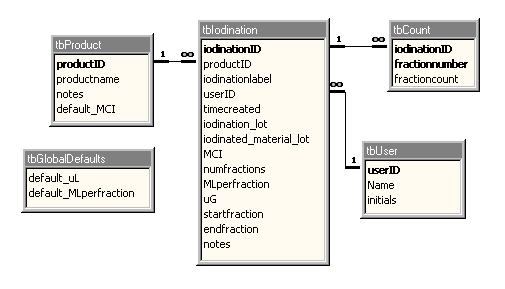
The current system uses internal files to store products and iodinations. The new system will use an Access database for that purpose. The data model is quite simple, as pictured below.
The main tables are tbProduct, tbIodination and tbCount, used to store product information, data about iodinations, and gamma counts for all fractions in an iodination, respectively.
The ID fields in bold are surrogate primary keys, used as internal unique identifiers for their respective tables. From the users point of view, a product is identified by the productname field. In the current system, a text string similar to the product name is used to label each iodination. I have formalized this with an iodinationlabel field. There are many iodination entries per product. There is effectively no limit to the number of iodinations kept in the database. However, if there is no reason to keep iodinations beyond a certain date, old iodination data should be deleted or offloaded to an archival database. There are between 10 and 500 fractions per iodination in tbCount.
The iodination table contains all inputs necessary to compute the two derived values:
Note the field iodinated_material_lot in tbIodination, which represents information not currently stored in the current system. I have included some default values where they seem to be useful: According to Samir, the default uL is always 10. The default ML per fraction is 2 but other small integer values are also used.
A concept of user has been explicitly modeled. The user notion could be extended to include per-user passwords and per-user levels of data access. The database does not need to be multi-user for database updates since it has been stipulated that the system will only interface to a single gamma counter. Multiple users should be able to view data simultaneously.
2.2 Count Reader
The counts will be processed by a new driver, dubbed 'count reader', which reads data coming in over a serial communications port (COM1 for the Iso-Data machine, COM2 for the Wallac machine.). To implement the count reader, we should be able to use MSCOMM32.OCX which ships with Visual Basic or use of a third party package such as Async Professional.
For purposes of efficiency and reliability during gamma counter operation, I recommend that the count reader store counts into a temporary data structure which is later transferred to the database after all counts for an iodination are completed.
2.3 Graphical display of iodinations
The current iodination graphing function is to be duplicated/improved.
The graphical display, zooming, and printing functions would require substantial programming to reimplement from scratch. Fortunately, third party 'controls' are available which implement graphing via fast implementations and which can be fit into an Access of VB program like a piece into a puzzle. One candidate third party control is ChartFX which produces charts under program control. An example of a graph created with ChartFX is illustrated below.
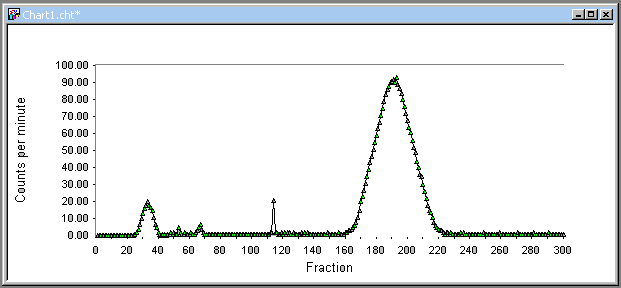
I 'generated' the above graph after downloading a trial copy of ChartFX. I opened a design tool in Chart FX, specified the type of graph (scatter chart), axis labels, number of points, etc. and then populated the underlying data by hand.
ChartFX provides an API (Application Program Interface) to programs so that whatever you can do manually can be done under program control. The features include populating the chart with data, changing the scale of the axes, zooming, panning, changing colors, etc. In addition ChartFX permits detection of mousing on the chart so the custom behavior may be achieved in response to the user mouse clicks in the chart.
2.4 Reports
Reports should show any combination of the following information:
Inputs and Outputs ought to be displayed with either the CPM listing or the graph, so things boil down to two reports, the CPM listing and the CPM graph, possibly zoomed. The CPM listing is easily implemented in Microsoft Access. The graph report can be printed by the third party control (e.g. ChartFX).
2.5 User Interface and Workflow
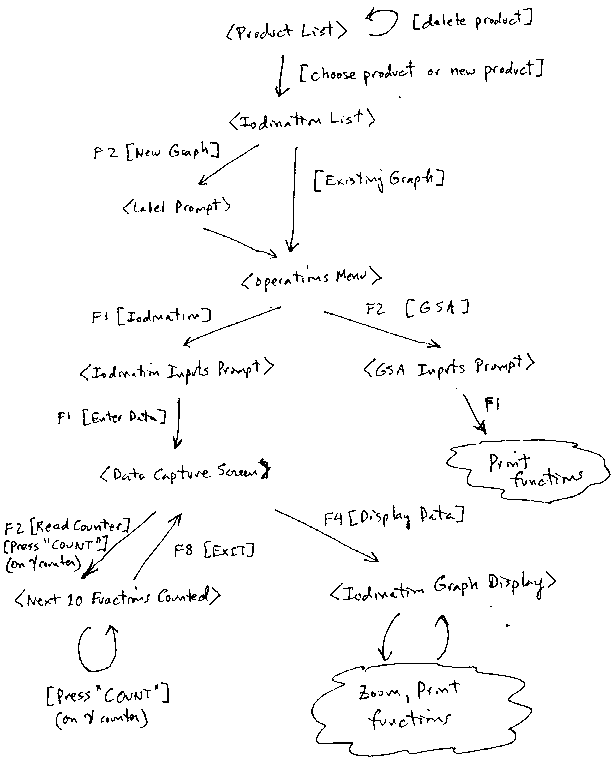
The current system uses a character-based menu-driven user interface. A flowchart of the current system is provided in Appendix 1. This workflow can be replaced by an object centered UI (user interface) in which one is at all times viewing an object (or set of objects) and has the ability to perform operations on that object (or set of objects). I propose that we reduce the UI to four screens, implemented as forms dubbed <ProductList>, <Iodination List>, <DataCapture>, and <Graph>, each replacing the corresponding screen in the current system (see Appendix 1). The other screens in the current system only serve to enter input parameters or names of new entries. These may be replaced in the new system by displaying the parameters as part of the form for which are parameters. For example, all iodination and GSA parameters may be shown near the top of <DataCapture> and <Graph> and will be blank the when a new Iodination record is viewed. All operations available in a given screen will be available via buttons (as in the current system), as menu items, or both.
An additional report to list all products should be added and provided as a menu item of the <ProductList> form.
Mock ups of the forms are displayed below.
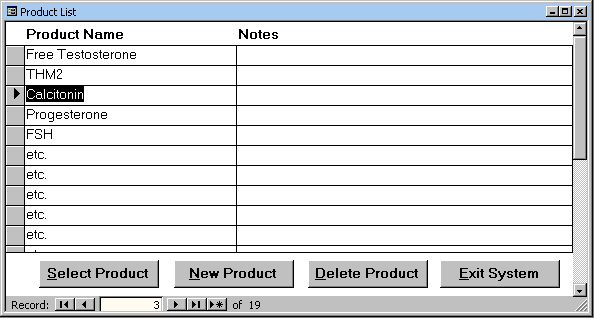
Notes may be unnecessary. Additional information such as 'date introduced' could be added. Selecting a product brings up the <Iodination List> form for the highlighted product. Creating a new product verifies that product name is unique.
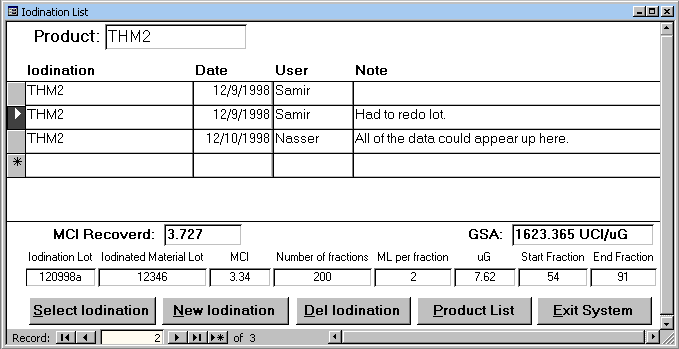
The data at the bottom of the form is for the currently selected iodination. When a new iodination is added, all fields are blank. The computed fields MCI Recovered and GSA do not appear unless all inputs necessary for their computation are not Null.
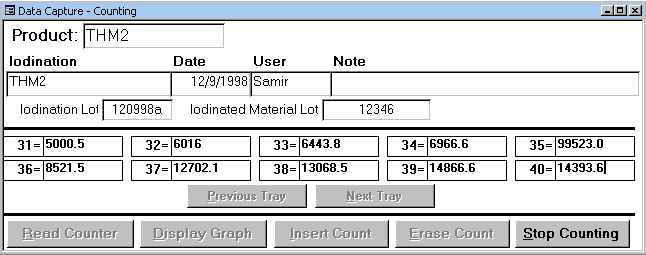
While counting, only the 'Stop Counting' operation is available. When the COUNT button on the physical gamma counter is pressed, the next ten counts appear in the count area. Counts are shown in blocks of ten only (a 'tray'). Should we provide a form display for all counts? Should the Insert and Erase buttons be eliminated? Menu will offer option to print all counts.
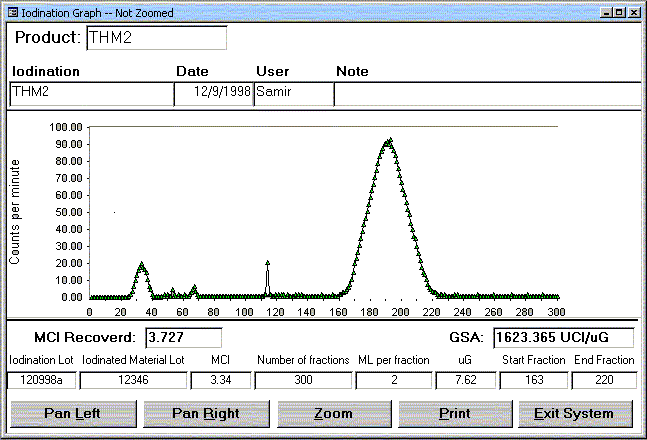
Print will query user for precisely what information is to be printed (graph only, GSA, etc.)
3. Tasks and time estimates
Here is my rough estimate as to the tasks and time needed to complete the design and implementation of the Gamma Counter Software system. The time estimate for each task is for total time allocated to that task over the lifetime of the project.
|
Task |
Days |
|
Data Model Refinements |
1 |
|
Finish initial UI design |
1 |
|
Initial UI design refinements based on user feedback |
1 |
|
Implement <Product List> form, including menu |
0 |
|
Implement <Iodination List> form, including menu |
2 |
|
Select serial communications control to be used by the count reader, integrate with Access Visual Basic for Applications (VBA), and run tests to verify performance and reliability. |
2 |
|
Implement <Data Capture> form and integrate with Count Reader |
5 |
|
Select graph display control to handle display, zooming, and printing of graphs. Integrate with Access VBA and run tests to verify performance and reliability. |
2 |
|
Implement <Graph> form and integrate with graph control |
5 |
|
Implement hard copy reports |
2 |
|
Implementation and refinements of overall workflow, menus, login, fonts, colors, etc. |
3 |
|
Testing, bug fixes, further refinements based on user feedback |
5 |
|
Total: |
29 days |
Appendix 1: High Level Flowchart of current system.